Know whether you already took today's pill, at a glance, from your Home Screen. One tap to log it. Reminders only if you haven't. Nothing ever leaves your iPhone.
No accountNo adsNo trackingWorks with Siri10 languages
LDL
Not logged today
13 days logged
It's 9 PM. The bottle's on the counter.
Did you take it this morning, or was that yesterday?
Reminders tell you when to take it. Taken tells you whether you did.
How it works
One tap. That's the whole thing.
Taken lives on your Home Screen. Take your pill, tap the widget, done. Next time you wonder, the answer is already there, with the time you took it.
1
Add your pillA name and how often. Setup takes under a minute.
2
Add the widgetOne per pill. Each stays one tap.
3
Tap after you take itMis-tapped? Undo stays on the widget for 30 seconds.
LDL
Not logged today
13 days logged
Go on, tap Take. It's the real interaction.
Siri & Apple Intelligence
Just ask: "did I take it?"
Hands full, bottle on the counter? Ask Siri. Taken answers out loud, with the time you logged it, and logs or undoes a dose by voice. It knows your pills by the names you gave them.
1
Your names, not a drug list"Fish oil", "LDL", "Mom's BP med", "鱼油". Siri matches what you call it, even part of the name.
2
Never guessesIf two pills could match, Siri asks which. Logging the wrong pill would defeat the point.
3
Smarter with Apple IntelligenceSiri understands more natural wording. Without it, the phrases still work on iOS 17.
One press, no appOn iOS 18, put "Log a pill" in Control Center, on the Lock Screen, or on the Action button. Try it.
Your pill, your name
Thursday, October 19:02
Features
Certainty about the past. Not nagging about the future.
History
Every dose, on a calendar.
See your streak, your best run and every day you logged. A glowing check means logged. A day without one is just a day without a log, never a red "missed".
Streaks count days logged, never "adherence".
Freezes keep a streak going over a day you didn't log.
Forgot to log yesterday? Add it from the calendar.
Switch to Year for the long view.
Your year
Your whole year, at a glance.
Switch History to Year and every month becomes a little grid of dots, with its count of days logged. It's the view for "how have I been doing since spring?", and a great one to show your doctor.
Only months since you started are shown, never a wall of empty grey.
Counts are days logged, never a percentage.
Tap any month to open it and see each day.
Late doses
12:30 AM still counts for last night.
Each pill's day starts at 4 AM, so a dose you take after midnight belongs to the evening it was meant for. Tomorrow evening still asks you, instead of wrongly saying "Taken".
8 PM
midnight
4 AM
Tuesday's dayWednesday
Taken at 12:30 AM: logged for Tuesday evening. Change when a pill's day starts in Settings.
Reminders
Only if you haven't logged it.
Turn on a reminder for any every-day pill. If you've already logged it, the reminder simply never comes. Tap I took it right on the notification.
My usual time: Taken learns when you usually log and reminds you 30 minutes after.
Late-night catch-ups and reminder taps don't skew it.
Never says "missed". Just "not logged yet today".
TAKEN
Vitamins
Already logged today: no reminder sent.
TAKEN
LDL
LDL isn't logged yet today.
I took it
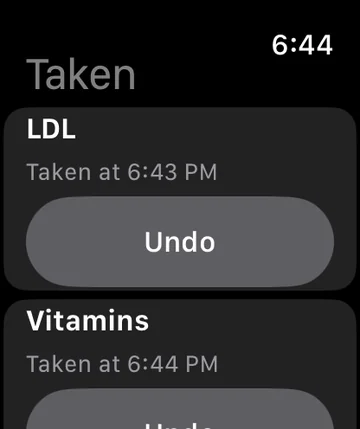
Apple Watch
Log from your wrist.
Every pill, one tap. The watch shows "Sending…" until your iPhone confirms, so it never claims a dose that wasn't recorded. Undo any dose from today, right there.
For your doctor
Your history, as a PDF.
Export a clean report with each pill's calendar and every dose: when it was logged and how. It's ready to print or share at your next appointment.
Includes pills you stopped tracking.
Honest about timing: a late dose shows its real time.
Made on your iPhone. Shared only where you choose.
Every pill you take
Add as many as you need, each with its own widget, history and settings.
Every day, or when you take it
Daily pills keep a streak. Optional ones, like a vitamin you take some days, just keep a record.
Not sure? Count the bottle
Set a bottle count and Taken compares what's left with your log. It can add a dose it proves, never remove one.
Light and dark
Follows your iPhone's appearance, glowing either way.
Yes. That's the point. Log from the Home Screen widget, Apple Watch, Siri, or a Control Center button. The app is for history, settings and the occasional "not sure?".
Does it work with Siri?
Yes. Ask "Did I take Fish oil in Taken?" (using your own pill name), or say "Log" or "Undo". With only one pill you don't need to name it. On iOS 18 there's also a Control Center, Lock Screen and Action button control. Siri, Shortcuts and controls work on iOS 17 and later; Apple Intelligence makes Siri understand more natural wording.
Will it nag me?
Only if you ask it to, and only if the pill isn't logged yet. Reminders are off by default and never fire after you've logged.
Which iPhone do I need?
Any iPhone with iOS 17 or later (for one-tap widgets). Apple Watch needs watchOS 10 or later.
Is Taken medical advice?
No. Taken is a record of what you log. Always ask your doctor or pharmacist about your medication.


 TAKEN
TAKEN